Discover how a PCB BOM streamlines PCBA manufacturing. Our guide offers expert tips and tools for error-free PCB assembly, accurate sourcing, cost control, and on-time production for industrial buyers, engineers, and procurement teams.
Imagine heading to the grocery store with a detailed shopping list to ensure you get everything you need, organized and error-free. In PCB manufacturing, a Bill of Materials (BOM) serves the same purpose for PCBA manufacturing. A well-crafted PCB BOM lists all components required for PCB assembly, guiding manufacturers to deliver high-quality, cost-effective solutions for projects like rapid prototyping or full-scale production. We understand the critical role a BOM plays in streamlining procurement and ensuring your project meets specifications. In this guide, we’ll explore what a BOM is, why it’s essential, and how to create one to optimize your PCBA process. Let’s dive in!
What Is the Bill of Materials (BOM)?
A Bill of Materials (BOM) is a comprehensive list detailing all components and materials needed for PCB assembly and PCBA manufacturing. It acts as a blueprint, ensuring manufacturers procure the exact parts for your project. The PCB BOM includes critical details such as Manufacturer Part Numbers (MPNs), quantities, and reference designators, enabling accurate component sourcing and placement on the printed circuit board. For complex projects, a multi-level BOM organizes sub-assemblies, enhancing clarity. A well-prepared PCB BOM minimizes errors, streamlines the PCBA process, and ensures your project meets design specifications, whether for prototyping or production.
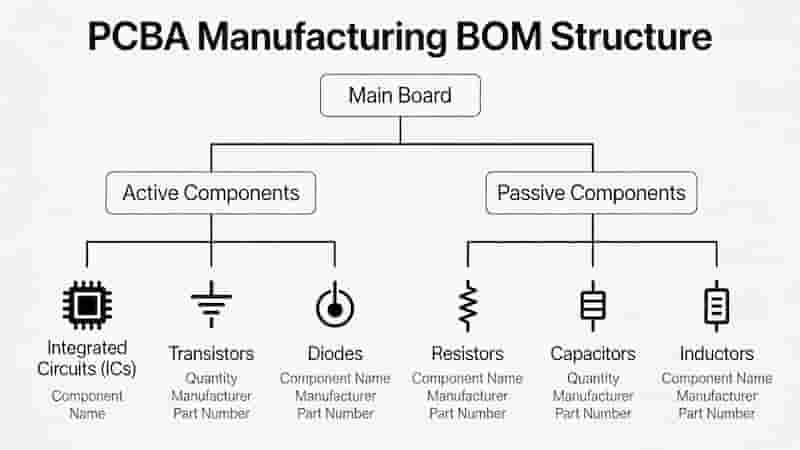
Example of Bill of Materials (BOM) Form
Download The Example of Bill of Materials (BOM)
Why Is the BOM So Important?
A Bill of Materials (BOM) is the backbone of successful PCB assembly, acting as a critical guide for manufacturers. A precise PCB BOM ensures efficiency and accuracy throughout the PCBA manufacturing process. Here’s why it’s essential:
- Streamlines Component Procurement: Organizes sourcing for efficient PCB manufacturing.
- Enables Accurate Cost Estimation: Lists quantities and part numbers to provide precise quotes for cost-effective projects.
- Optimizes Inventory Management: Prevents shortages or overstocking during production.
- Facilitates Material Planning: Tracks requirements for smooth workflows.
- Ensures Supply Chain Accuracy: Minimizes errors in part selection.
- Reduces Waste and Costs: Eliminates unnecessary purchases, supporting low-cost PCB assembly.
An accurate PCB BOM ensures your project meets deadlines and quality standards, whether for startups needing prototypes or large-scale production.
What Should Be Included in a PCB BOM?
A well-structured PCB BOM is vital for seamless PCBA manufacturing, ensuring manufacturers source and place components accurately. Including the right details minimizes errors and speeds up production. Below are the essential and recommended elements for your Bill of Materials:
- Manufacturer Part Number (MPN) – Essential: Uniquely identifies each component for precise sourcing.
- Quantity – Essential: Exact number of components needed per board.
- Reference Designator – Essential: Matches PCB silkscreen for correct placement.
- Manufacturer Name – Recommended: Ensures authentic component sourcing.
- Description – Recommended: Includes value, package, voltage, tolerance.
- Component Value – Optional: Resistance, capacitance, or rating for clarity.
| Item No. | MPN | Manufacturer | Quantity | Designator | Description |
|---|---|---|---|---|---|
| 1 | GRM188R71H104KA93D | Murata | 5 | C1, C5, C7, C14, C20 | 0.1µF, 50V, 0603 |
| 2 | CRCW060310K0FKEA | Vishay | 2 | R1, R2 | 10kΩ, 1%, 0603 |
By including these elements, your PCB BOM ensures high-quality, error-free PCB assembly tailored to your needs.
How to Create a PCB BOM?
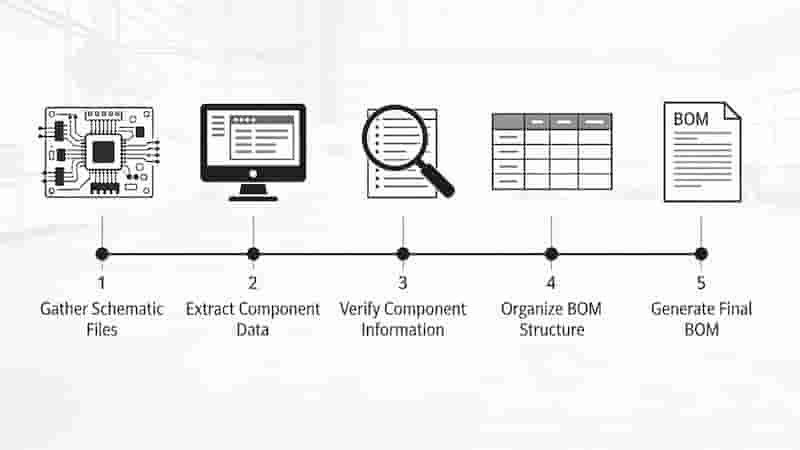
Creating an accurate PCB BOM is essential for seamless PCBA manufacturing. A well-prepared BOM ensures manufacturers source components efficiently and assemble your PCB without errors. Follow these steps to create a reliable Bill of Materials:
- Choose a Format: Use Excel or CSV, compatible with Altium, KiCAD, and manufacturing systems.
- Define Column Headers: Item, MPN, Quantity, Designator, Manufacturer, Description, Value.
- Fill in Component Details: Use schematic data for accuracy.
- Verify and Validate: Check MPNs, availability, quantities, and alternate parts.
- Submit to Manufacturer: Send Excel/CSV for review and production readiness.
Pro Tip: Use PCB design software or OpenBOM to automate PCB BOM creation. Complex projects benefit from multi-level BOMs for sub-assemblies.
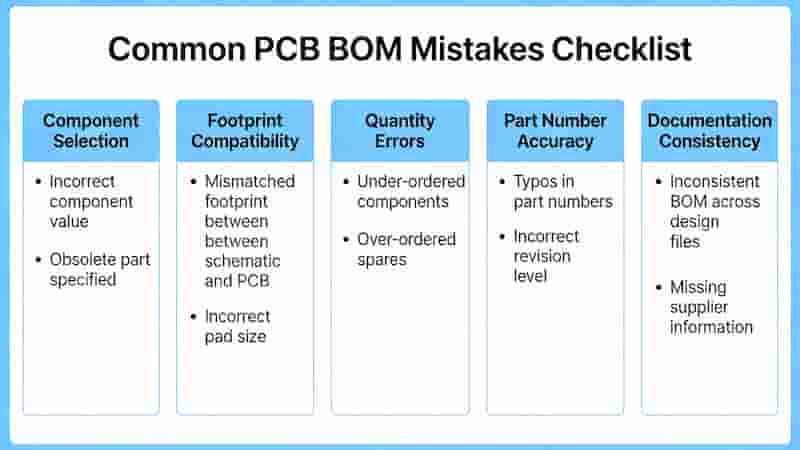
Common PCB BOM Mistakes and How to Avoid Them
Creating an accurate PCB BOM is critical, but errors can lead to delays or faulty assemblies. Below are frequent mistakes and solutions to keep your project on track:
- Incorrect MPNs: Verify via DigiKey, Mouser, or datasheets; add alternates.
- Missing Reference Designators: Cross-check with schematics and Gerber files.
- Inaccurate Quantities: Count from schematics and add spares.
- Obsolete Components: Check availability and list replacement parts.
- Incomplete Descriptions: Include value, package, voltage, tolerance.
BOM Accuracy Checklist: Valid MPNs • Matching designators • Correct quantities • Alternate parts • Full descriptions • Excel/CSV format.
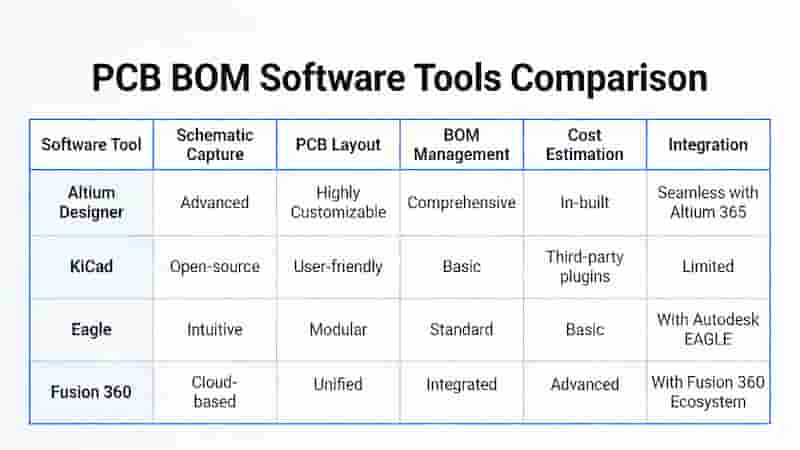
Tools and Software for PCB BOM Creation and Management
Efficient PCB BOM creation reduces errors and speeds up PCB assembly. These tools are industry-standard for global manufacturing:
- PCB Design Software: Altium Designer, KiCAD, Eagle – auto-generate accurate BOMs.
- BOM Management Platforms: OpenBOM, Arena PLM, OrCAD – multi-level and team collaboration.
- Spreadsheets: Excel, Google Sheets – simple, universal, manufacturer-friendly.
- Component Databases: DigiKey, Mouser, Octopart – validate MPNs and availability.
We support Excel and CSV PCB BOM files and offer free templates to get started quickly.
Tips for Collaborating With Your PCBA Manufacturer
Strong communication ensures your PCB BOM translates into flawless PCB assembly. Use these best practices:
- Confirm BOM format (Excel/CSV) and use provided templates.
- Flag non-standard or obsolete parts early for alternate suggestions.
- Request a professional BOM review to catch errors.
- Specify assembly type: SMT, THT, mixed, or rigid-flex.
- Share project timelines for urgent or high-volume orders.
- Maintain clear communication for updates and support.
Final Words on PCB BOM and PCBA Manufacturing
A PCB BOM is the cornerstone of successful PCBA manufacturing, guiding component sourcing and assembly from prototyping to full production. With accurate MPNs, quantities, and designators, you eliminate delays, control costs, and ensure consistent quality. Our expert team supports PCB assembly projects worldwide with reliable sourcing, fast turnaround, and professional PCB BOM review to ensure error-free production.
Ready for Error-Free PCB Assembly?
Send us your PCB BOM for a free review and fast quote for your next project.
Request a Quote
Get your free PCB BOM template today!